
Capture voice notes on mobile
Use mobile capture and the mobile floating ball for thoughts, field notes, quick reminders, search, Favorites, AI Chat, and Journal handoff.
- Audience
- Mobile-first users who capture ideas away from the desk.
- Time
- 15 minutes
- Level
- Beginner
Scenario
Start with the workflow this guide is designed for before moving into the steps.
As a founder walking between meetings, I want to capture a thought before it disappears and review it later on desktop.
You can record or import a mobile note, use each floating-ball direction correctly, and decide whether the finished recording should become a record, search, Favorite, AI Chat, or Journal entry.
Feature tour
Preview the relevant screens and short guide before following the steps. This section highlights the entry point, expected result, and next path.
1
Guide items
1
Screens
0
Video
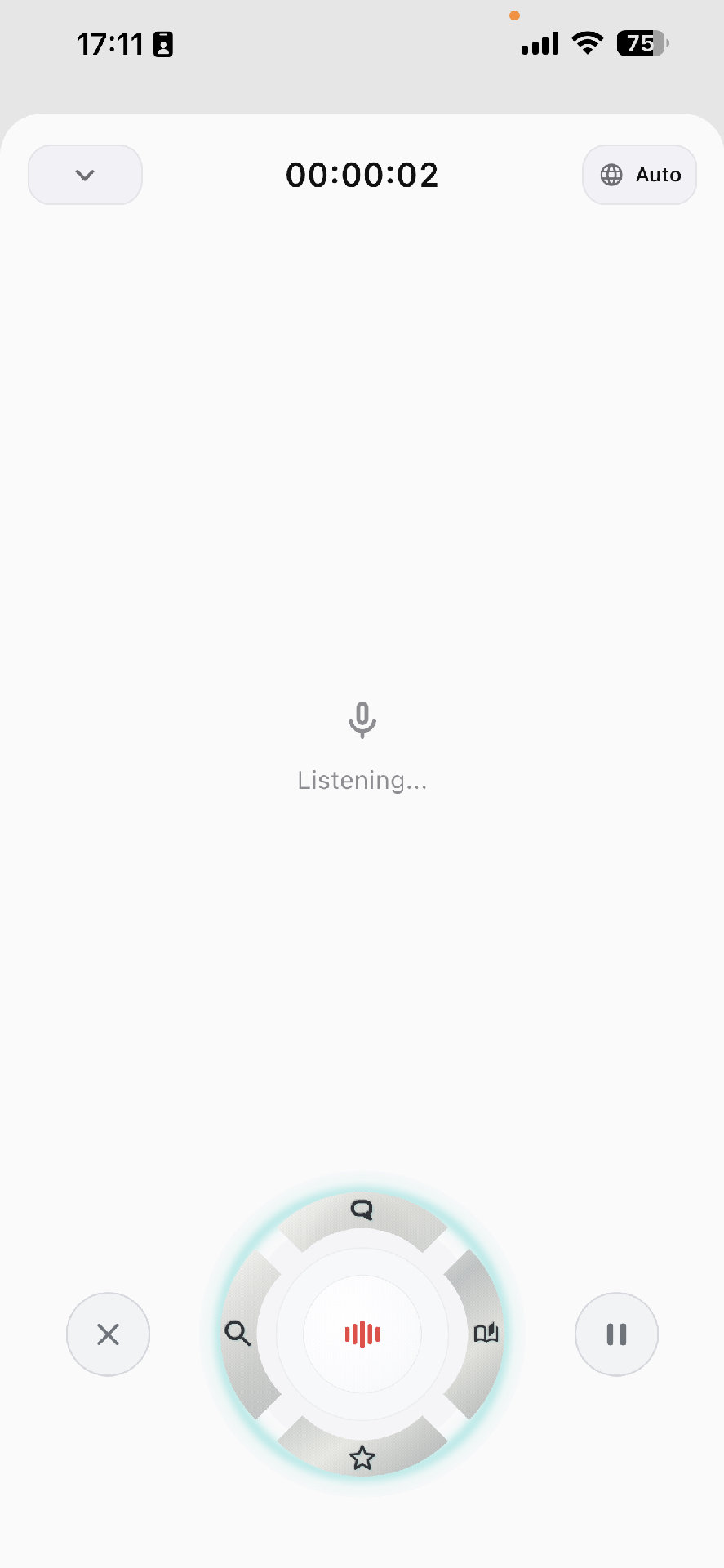
Mobile floating ball action wheel
Steps
Open the mobile capture surface
Use the installed mobile app or supported share/import path available in your current build. When live capture is active, the mobile floating ball appears as the main capture controller.
Read the mobile floating ball before tapping
The mobile floating ball is a capture completion wheel, not the same always-on desktop floating ball. The center finishes the recording as a normal record. The side buttons outside the wheel cancel or pause/resume. The four wheel directions stop the recording and send the transcript to a specific next action.
Choose the correct wheel direction
Use the four directions only when you already know the next job. Top opens AI Chat with the finished transcript as context, left searches the transcript in the browser, right structures the recording into the daily Journal, and bottom saves it as a Favorite with AI blocks when available.
Keep it short and tagged by intent
For mobile capture, speak the context first: where you are, what happened, and what needs action.
Review later on a larger surface
Use mobile for capture speed and desktop/web for deeper review, editing, and organization.
Details
Mobile floating ball action map
The mobile floating ball appears inside the capture screen. It is optimized for deciding what to do with the current recording the moment you stop.
- Center: stop, process, and save as a record.
- Top sector: stop, process, then open AI Chat with the record context and an auto-sent initial message.
- Left sector: stop, process, then open an external browser search using the processed transcript.
- Right sector: stop, process, then structure the transcript into the daily Journal entry.
- Bottom sector: stop, process, then save the result as a Favorite and open the Favorite detail when it is ready.
- Outside left and right buttons are separate from the wheel: cancel/discard, and pause/resume.
How mobile differs from desktop floating controls
Do not transfer desktop floating-ball habits directly to mobile. Desktop controls are designed for cross-app input and long-form work; mobile controls are designed around the current capture session and the next destination after stop.
- Mobile actions usually stop and process the current recording first.
- Desktop hotkeys and floating controls are configured from desktop settings.
- If you only want to pause, use the outside pause button, not a wheel sector.
- If you are unsure where the note should go, use center stop and decide later from Records.
Mobile capture pattern
A reliable mobile note starts with context, then states the observation, then names the next action.
- Context: where and why this matters.
- Observation: what you noticed.
- Action: what should happen next.
Connected feature paths
This tutorial should not dead-end. These are the natural next features and workflows it connects to.
Manage and find records
Keep records searchable, reviewable, and safe to reuse.
Save and reuse Favorites
Turn important transcript moments, notes, questions, references, and actions into reusable cards.
Chat with records
Ask questions against a transcript, extract decisions, and keep the answer grounded in the current record.